
If you’ve spent any time studying for the Network+ Like i have, you’ve seen the 7-layer pyramid of the OSI (Open Systems Interconnection) Model. It can feel like a lot of dry theory, but without it, the modern internet and your job as a technician would be a nightmare.
Before we dive into the layers on Monday, we need to understand why we use this model in the first place
1. The Tower of Babel Problem
In the early days of computing, networking was proprietary, meaning if you bought an IBM computer, you can only talk to other IBM computers and you are forced to use IBM cables and IBM protocols. If you wanted to connect a DECnet system to an IBM system, you just couldn’t.
The OSI model was created by the ISO (International Organization for Standardization) in 1984 to fix this issue. It provided a “Universal Language.” Now, a cisco router, a Dell server, and an Apple iPhone can all co mmunicate perfectly because they all agree on the same 7-layer rules.
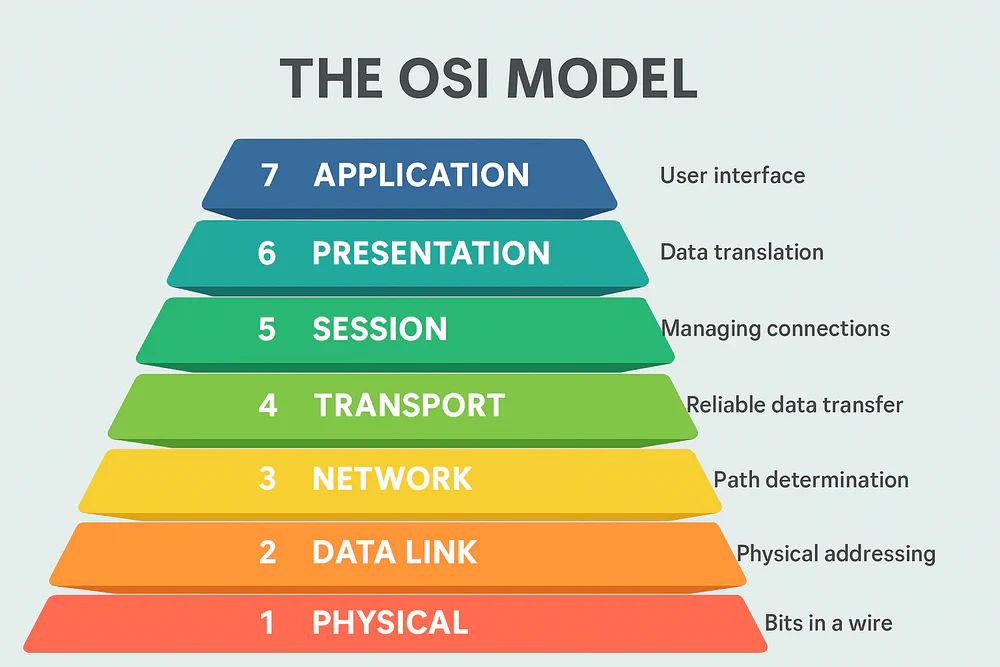
2. The Power of “Modularization”
Think of the OSI model like a set of LEGO bricks. Because the model is modular, developers can change one “brick” without breaking the whole tower.
- Example: When we transitioned from the old 802.11n Wi-Fi to the new Wi-Fi 6 (802.11ax), We only changed the Physical (Layer 1) and Data Link (Layer 2) rules.
- The Result: Your web browser (Layer 7) didn’t care. It kept working exactly the same because the layers are independent.
3. The “Standard Operating Procedure” for Troubleshooting
As a Support Associate, the OSI model is your best diagnostic tool. It will allow you to use a “Top-Down” or “Bottom-Up” troubleshooting approach.
- Bottom-Up: You check the cable (Layer 1), then the link light (Layer 2), then the IP address (Layer 3).
- Top-Down: You check the application settings (Layer 7), Then the encryption (Layer 6), then the port connection (Layer 4).
By isolating the problem to a specific layer, you stop guessing and start solving. If you can ping an IP address but can’t open the website, you know the “Network” (Layer 3) is fine the problem is most likely higher up in the stack.
4. Encapsulation: The Digital Envelope
One of the most important concepts we might see on the exam is Encapsulation.
Imagine sending a letter. You write the data (Layer 7), You put it in an envelope (Layer 4), write the address (Layer 3), put it in the mail box (Layer 2), and put it on a truck (Layer 1). As the data moves down the model, each layer “wraps” it in a header containing the instructions it needs to reach the next step.
🚀 The Weekend Challenge
As you head into the weekend, try to look at the devices around you through the lens of the OSI model. When you plug in your charger that’s Layer 1. When your phone connects to the Wi-Fi, That’s Layer 2.
On Monday, We will kick off our 7-day deep dive starting at the very bottom: Layer 1 – The Physical Layer.
📚 Sources & Further Reading.
- CompTIA Network+ N10-009: Objective 1.1 – The OSI Model.
- IEEE Spectrum (Andrew L. Russell) – History of the OSI Model
- Professor Messer – Understanding the OSI Model
- Jason Dion – Section 3: OSI Model
This article is an independent summary of my learning journey. All trademarks and copyrighted materials belong to their respective owners.