
Objectives Covered
- 1.2 – Compare and Contrast networking appliances, applications, and functions
- 1.6 – Compare and contrast network topologies, architectures, and types
- 2.3 – Given a scenario, select and configure wireless devices and technologies
To build a secure house, you need to understand the materials, To build a secure network, you will need to understand the appliances, the geography, and the architecture that holds it all together. Today, I am breaking down the foundational “blocks” of the Network+ Curriculum.
The Hardware: Appliances & Functions (Obj 1.2)
Every device on a network has a specific job. Think of this as the “citizens” of your infrastructure.
The “Legacy” and the “Smart”
- Hubs vs. Switches: Hubs are “dumb” they will let everyone know on the network what information is being sent. They Broadcast traffic to everyone (Layer 1). Switches are “smart” they use MAC Addresses to send data only to the intended recipient (Layer 2),
- Routers: The gateways. They will connect different networks (your home network to the ISP) using IP Addresses (Layer 2).
- Firewalls: The bouncers. They inspect traffic and decide what gets in based on the security rules that are set up.
Specialized Security & Storage
- IDS/IPS: An IDS (Intrusion Detection System) watches for trouble and alerts you; an IPS (Intrusion Prevention System) sees the trouble and actively tries to stop it.
- Load Balancers: These act like traffic cops, distributing incoming requests across multiple servers so no single server gets overwhelmed.
- NAS vs. SAN: A NAS (Network Attached Storage) is a single device providing files; a SAN (Storage Area Network) is a high-speed network of muliple storage devices that appear as local drives to a server.
Proxy Servers will act as an intermediary for requests from clients, They can provide anonymity, security, and even “caching” to speed up responses!
Geography: How Big is Your Network? (Obj 1.6)
It’s easy to get lost in the alphabet soup of network types. Here is how i remember them by scale.
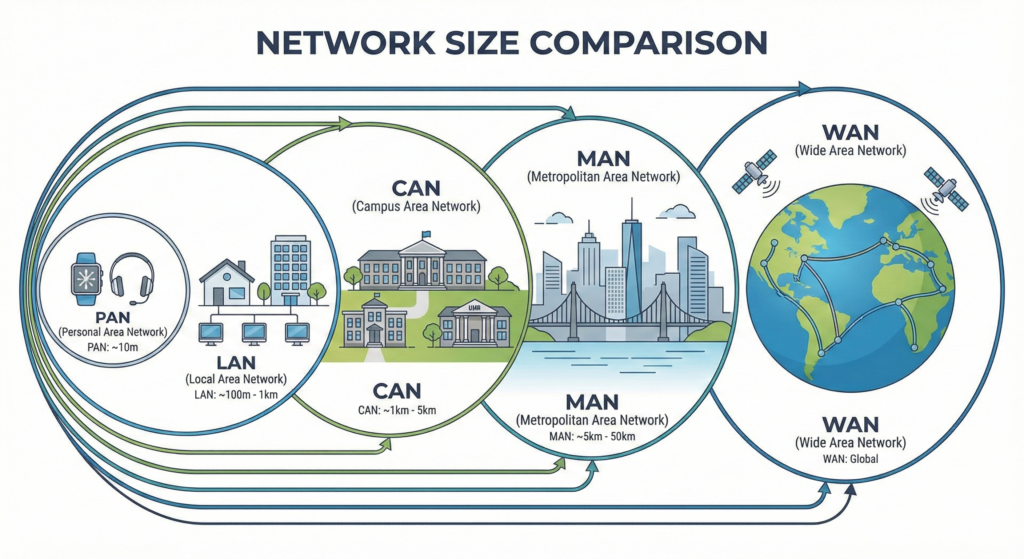
| TYPE | Full Name | Scale Reference |
| PAN | Personal Area Network | Your Bluetooth headphones to your phone |
| LAN | Local Area Network | Your house or a single office building |
| CAN | Campus Area Network | Multiple buildings in the same area (like a University). |
| MAN | Metropolitan Area Network | A network covering an entire city |
| WAN | Wide Area Network | Connecting cities or countries (The internet is the ultimate WAN) |
Topologies: The Map of the Network (Obj 1.6)
Topology is simply the “Shape” of how devices are connected.
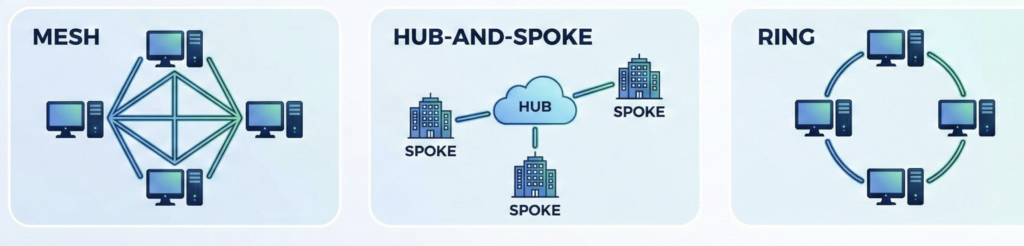
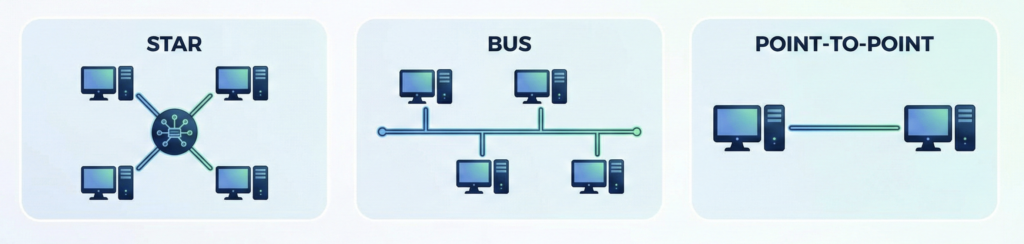
The Physical Shapes
- Star: Everything connects to a central switch. (Most common topology today)
- Mesh: Every Device connects to every other device. Highly redundant but extremely expensive.
- Hub-and-Spoke: A main office (hub) connects to several brach offices (spokes).
Datacenter Architecture
In modern datacenters, we move away from “Stars” and toward Spine-and-Leaf architecture.
- North–South Traffic: Data moving out of the datacenter to the internet.
- East-West Traffic: Data moving between servers within the same datacenter
Wireless & Peer-to-Peer (Obj 2.3)
Wireless isn’t just “WiFi” it has different modes of operation
- Infrastructure Mode: Devices connect to a central Wireless Access Point (WAP).
- Ad Hoc Mode: Devices connect directly to each other without a WAP (like a quick file transfer between laptops).
- Wireless Mesh: Multiple APs work together to cover a large area without needing wires to every single unit.
Network Models: Who is in Charge?
- Client/Server: A central server provides resources (like a website) to many clients. (Think: Professional IT).
- Peer-to-Peer (P2P): Every computer is equal and shares its own resources. (Think: Home file sharing or early Napster/Limewire).
📚 Sources & Further Reading.
- CompTIA Network+ (N10-009) Objectives – CompTIA Objectives
- Jason Dion CompTIA Network+ (N10-009) – On Udemy
- Professor Messer – Network Topologies – Youtube
This article is an independent summary of my learning journey. All trademarks and copyrighted materials belong to their respective owners.